容器防护(通过安全容器部署)
该 容器防护 功能通过扩展和增强主机操作系统的安全层,为Linux容器工作负载及其主机提供保护。它利用服务器工作负载端点检测与响应、高级反漏洞利用、Linux专用反漏洞利用技术以及反恶意软件扫描服务和威胁防护功能。您可选择启用或禁用各安全模块。
重要提示
本功能可通过两个组件部署:
-
一个 最佳 代理(包含 容器防护 模块)需安装在已部署Docker的Linux主机上。
-
一个 安全容器 部署于Linux主机终端下。 安全容器 是运行Ubuntu 20.04基础镜像及 BEST 的Linux版本。它以特权容器身份运行在容器主机上。
本指南为您提供如何使用安全容器部署该功能的信息。
提示
在本指南中,我们将安全容器简称为BSC(Bitdefender安全容器)。
当前安全容器提供以下有限功能集的访问权限:
-
反恶意软件
-
EDR传感器
-
高级反漏洞利用
-
容器保护
部署在Linux主机上时,安全容器能够保护主机及运行在该主机上的其他容器。
组件
容器保护 使用以下组件:
-
GravityZone 虚拟设备
-
一个安全容器。
-
未安装安全代理的Linux主机。
安装与配置 容器保护
本指南将演示如何在Kubernetes集群上部署安全容器。
在您的终端上安装此功能有三种可能方案:
-
登录 GravityZone 控制中心 .
-
进入 网络 > 安装包 从左侧菜单。
-
选择您要用于安装过程的软件包。

该软件包必须已启用 容器保护 模块。
提示
有关如何编辑或创建新软件包的信息,请参阅 创建安装包 .
-
点击 下载 并选择 安全容器 :
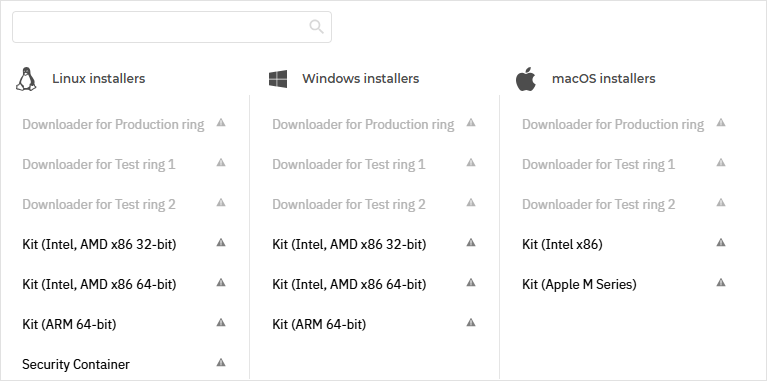
这将打开 下载 安全容器 界面。该界面提供了在所有支持的Kubernetes环境中安装 安全容器 的脚本。
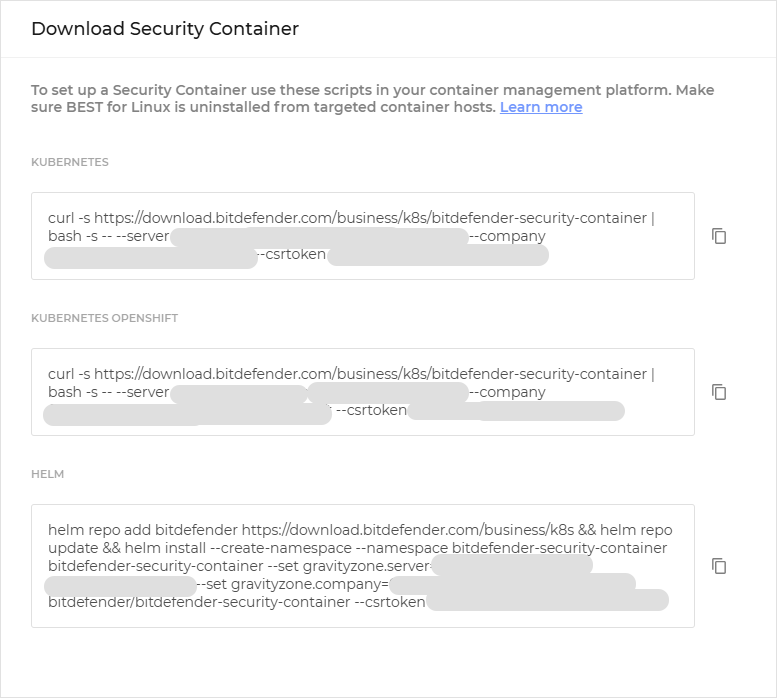
重要提示
目前,Openshift环境仅与Azure Kubernetes服务(AKS)和VMware兼容。
-
选择
 复制
按钮(位于您要安装
安全容器
.
复制
按钮(位于您要安装
安全容器
.
-
进入您的环境并运行脚本:
curl -s https://download.bitdefender.com/business/k8s/bitdefender-security-container | bash -s -- --server cloudirl-ecs.gravityzone.bitdefender.com:443 --company <COMPANY_ID>
configmap/bitdefender-security-container-config configured
daemonset.apps/bitdefender-security-container created
注意
这将在您指定集群的每个主机上部署一个 安全容器 实例。
相关资源将创建在名为
bitdefender-security-container. -
检查所有Pod是否正常运行:
root@tcor-temp-workspace:~# kubectl get pods -n bitdefender-security-container -o wide
NAME                                   READY   STATUS    RESTARTS   AGE    IP             NODE    NOMINATED NODE   READINESS GATES
bitdefender-security-container-6kzg7   1/1     Running   0          109s   10.17.13.92    node1   <none>           <none>
bitdefender-security-container-9m6bg   1/1     Running   0          109s   10.17.13.94    node4   <none>           <none>
bitdefender-security-container-fv7qc   1/1     Running   0          109s   10.17.13.123   node2   <none>           <none>
bitdefender-security-container-txnd6   1/1     Running   0          109s   10.17.13.93    node3   <none>           <none>
这些Pod通过 DaemonSet 对象部署。这确保每个集群节点始终运行一个Pod。如果发生错误导致Pod退出,DaemonSet将自动创建新的Pod。
root@tcor-temp-workspace:~# kubectl get daemonsets -n bitdefender-security-container
NAME                             DESIRED   CURRENT   READY   UP-TO-DATE   AVAILABLE   NODE SELECTOR   AGE
bitdefender-security-container   4         4         4       4            4           <none>          5m24s
-
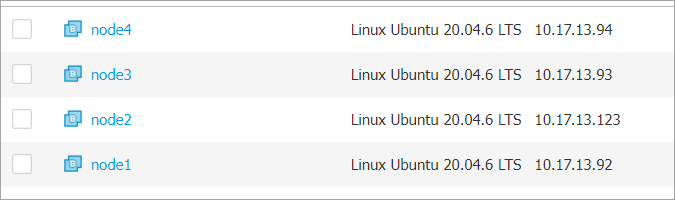
进入 GravityZone 控制台并导航至 网络 页面(从左侧菜单进入)。确认集群节点显示为容器主机。
-
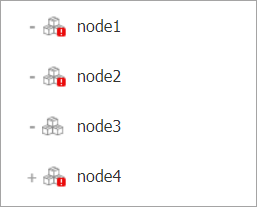
仍在 网络 页面时,前往 容器 > 自定义容器组 ,并检查是否为每个集群节点显示了一个容器组。
-
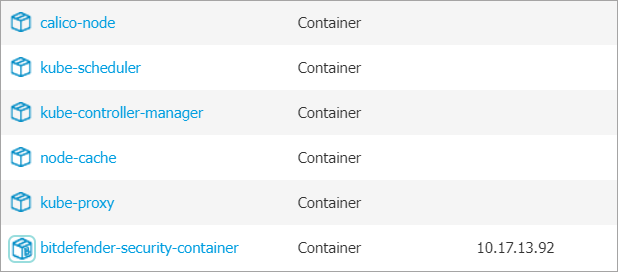
点击每个容器组展开,确保所有容器(包括带有独特图标的安全容器)均显示在Gravity Zone中。
注意
节点上可能已运行其他Kubernetes基础设施容器。
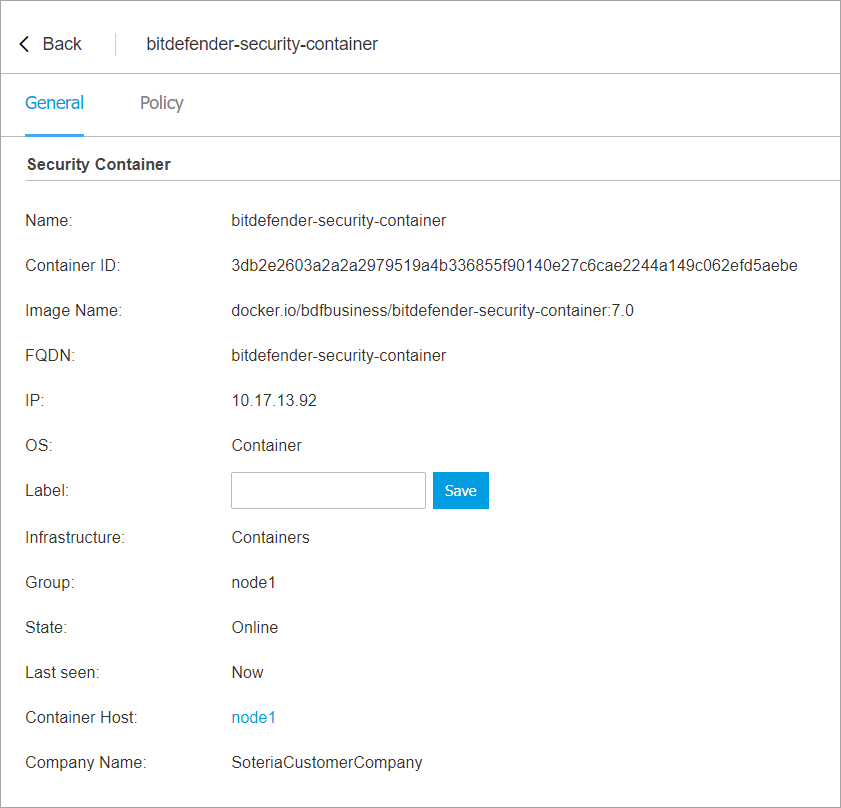
可点击安全容器查看详细信息。
-
通过以下任一方式验证部署:
-
在Kubernetes环境中使用
kubectlgetpods-nbitdefender-security-container命令。 -
在 GravityZone 控制台中,通过左侧菜单进入 网络 页面。
-
策略 用于在终端和通用功能层面启用及配置各项功能。
GravityZone 预置一组默认策略设置,专为满足最常见客户需求定制。这些策略默认会在 BEST 代理安装完成后,默认策略即被应用。您无法修改或删除默认的 GravityZone 策略。
您可以直接使用这些默认策略设置,稍后再配置策略;或按照以下步骤自定义功能:

测试新功能
测试部署
为确保在特定节点上部署成功,请按照以下步骤操作。
要与部署在该节点上的安全容器交互,需先进入该Pod内容器的shell环境。获得shell访问权限后,即可如同在常规机器上安装产品般操作所有产品文件(二进制文件、日志等)。
注意
容器日志不包含产品日志,需从容器内部访问这些日志。
-
在运行的Pod中打开shell并验证产品是否存在。
root@tcor-temp-workspace:~# kubectl exec -it bitdefender-security-container-6kzg7 -n bitdefender-security-container -- bash
root@node1:~# /opt/bitdefender-security-tools/bin/bdsecd -V
Bitdefender安全工具版本7.0.5.200049 (d0fd7aa8)
-
检查BEST进程是否正在运行。
root@node1:~# ps afx | grep bitdef
  27820 ?        S      0:00  |       \_ /bin/sh -c cd /; "/opt/bitdefender-security-tools/bin/bdwatchdogd" -c "/opt/bitdefender-security-tools/etc/bdwatchdogd.json"
  27821 ?        S      0:00  |           \_ /opt/bitdefender-security-tools/bin/bdwatchdogd -c /opt/bitdefender-security-tools/etc/bdwatchdogd.json
  27822 ?        Sl     0:43  |               \_ /opt/bitdefender-security-tools/bin/bdsecd -c /opt/bitdefender-security-tools/etc/bdsecd.json
  27920 ?        Sl     0:33  |               |   \_ /opt/bitdefender-security-tools/bin/bdsecd -c /opt/bitdefender-security-tools/etc/bdsecd.json -m fanotify -M
  27932 ?        S      0:00  |               |   |   \_ /opt/bitdefender-security-tools/bin/bdsecd -c /opt/bitdefender-security-tools/etc/bdsecd.json -m fanotify -M
  27936 ?        S      0:00  |               |   |   |   \_ /opt/bitdefender-security-tools/bin/bdsecd -c /opt/bitdefender-security-tools/etc/bdsecd.json -m fanotify -M
  33967 ?        S      0:00  |               |   |   \_ /opt/bitdefender-security-tools/bin/bdsecd -c /opt/bitdefender-security-tools/etc/bdsecd.json -m fanotify -M
  33968 ?        S      0:00  |               |   |   |   \_ /opt/bitdefender-security-tools/bin/bdsecd -c /opt/bitdefender-security-tools/etc/bdsecd.json -m fanotify -M
  33977 ?        S      0:00  |               |   |   \_ /opt/bitdefender-security-tools/bin/bdsecd -c /opt/bitdefender-security-tools/etc/bdsecd.json -m fanotify -M
  33978 ?        S      0:00  |               |   |   |   \_ /opt/bitdefender-security-tools/bin/bdsecd -c /opt/bitdefender-security-tools/etc/bdsecd.json -m fanotify -M
  33995 ?        S      0:00  |               |   |   \_ /opt/bitdefender-security-tools/bin/bdsecd -c /opt/bitdefender-security-tools/etc/bdsecd.json -m fanotify -M
  33996 ?        S      0:00  |               |   |   |   \_ /opt/bitdefender-security-tools/bin/bdsecd -c /opt/bitdefender-security-tools/etc/bdsecd.json -m fanotify -M
  34005 ?        S      0:00  |               |   |   \_ /opt/bitdefender-security-tools/bin/bdsecd -c /opt/bitdefender-security-tools/etc/bdsecd.json -m fanotify -M
  34006 ?        S      0:00  |               |   |   |   \_ /opt/bitdefender-security-tools/bin/bdsecd -c /opt/bitdefender-security-tools/etc/bdsecd.json -m fanotify -M
  34015 ?        S      0:00  |               |   |   \_ /opt/bitdefender-security-tools/bin/bdsecd -c /opt/bitdefender-security-tools/etc/bdsecd.json -m fanotify -M
  34016 ?        S      0:00  |               |   |   |   \_ /opt/bitdefender-security-tools/bin/bdsecd -c /opt/bitdefender-security-tools/etc/bdsecd.json -m fanotify -M
  34025 ?        S      0:00  |               |   |   \_ /opt/bitdefender-security-tools/bin/bdsecd -c /opt/bitdefender-security-tools/etc/bdsecd.json -m fanotify -M
  34066 ?        S      0:00  |               |   |       \_ /opt/bitdefender-security-tools/bin/bdsecd -c /opt/bitdefender-security-tools/etc/bdsecd.json -m fanotify -M
  28649 ?        Sl     0:11  |               |   \_ /opt/bitdefender-security-tools/bin/bdsecd -c /opt/bitdefender-security-tools/etc/bdsecd.json -m antimalware -M config=/opt/bitdefender-security-tools/var/lib/modules/antimalware/update.jso.temp
  29354 ?        Sl     1:31  |               |   \_ /opt/bitdefender-security-tools/bin/bdsecd -c /opt/bitdefender-security-tools/etc/bdsecd.json -m ctc -M config=/opt/bitdefender-security-tools/var/lib/modules/ctc/update.jso.temp
  27823 ?        Sl     0:04  |               \_ /opt/bitdefender-security-tools/bin/updated -c /opt/bitdefender-security-tools/etc/bdsecd.json
  27824 ?        Sl     0:04  |               \_ /opt/bitdefender-security-tools/bin/epagngd -c /opt/bitdefender-security-tools/etc/bdsecd.json
注意
由于节点上已运行多个容器,因此存在多个fanotify进程。
-
前往 网络 页面(通过 GravityZone 控制中心 .
-
选择需要验证的 容器主机以显示详细信息。
-
进入 防护 标签页并检查以下信息:
-
在 代理 部分确保 主扫描引擎 为
中央扫描且 备用扫描引擎 为混合扫描.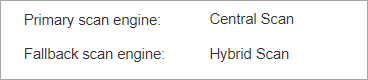
-
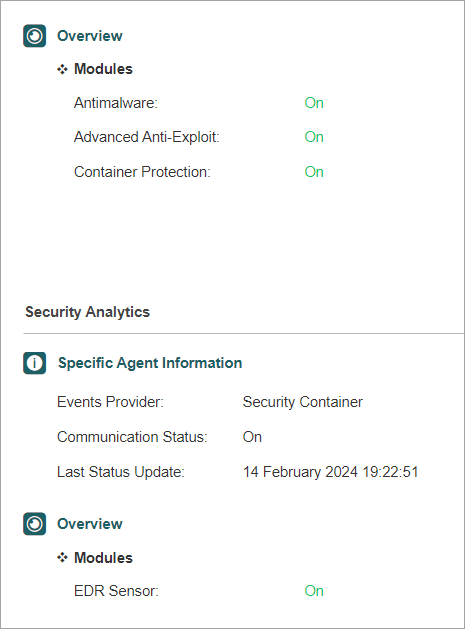
在 概览 部分确认 反恶意软件 , 高级反漏洞利用 , 容器保护 以及 EDR传感器 功能已启用。
-
若所有检查均通过,则确认部署成功。您可对集群中所有节点重复上述步骤。
测试实时防护功能
要测试BSC上的反恶意软件实时扫描基础功能,并验证防护是否覆盖容器主机及所有托管运行中的容器,请按以下步骤操作。
由于环境为Kubernetes集群,需通过DaemonSet定义以与BSC部署相同的方式(每个集群节点一个pod)创建其他pod。以下定义描述了一个持续运行50000秒的CentOS 7容器DaemonSet。
api版本: apps/v1
类型: DaemonSet
元数据:
  名称: centos临时
  命名空间: 默认
  标签:
    名称: centos临时
规范:
  选择器:
    匹配标签:
      名称: centos临时
  模板:
    元数据:
      名称: centos临时
      标签:
        名称: centos临时
    规范:
      容忍度:
      - 键: node-role.kubernetes.io/master
        操作符: 存在
        效果: 不调度
      - 键: node-role.kubernetes.io/control-plane
        操作符: 存在
        效果: 不调度
      容器:
      - 名称: centos临时
        镜像: centos:7
        命令: ["sleep", "50000"]
-
将此定义保存至名为
centos.yaml的文件中,置于集群外部。 -
运行此命令(该命令会微调文件以创建多个DaemonSet)。
for i in {1..5}; do sed "s/centos-temp/centos-temp$i/g" centos.yaml > /tmp/centos-tmp.yaml && kubectl apply -f /tmp/centos-tmp.yaml; done daemonset.apps/centos-temp1已创建 daemonset.apps/centos-temp2已创建 daemonset.apps/centos-temp3已创建 daemonset.apps/centos-temp4已创建 daemonset.apps/centos-temp5已创建 -
等待所有对象创建完毕且pod全部运行。
root@tcor-temp-workspace:~# kubectl get pods -o wide
名称                 就绪   状态     重启次数   年龄   IP               节点    提名节点        就绪门限
centos-temp1-4krnb   1/1    运行中    0          51秒  10.233.71.61     node3   <无>           <无>
centos-temp1-6fq8v   1/1    运行中    0          51秒  10.233.75.61     node2   <无>           <无>
centos-temp1-7fhqp   1/1    运行中    0          51秒  10.233.102.135   node1   <无>           <无>
centos-temp1-s2985   1/1    运行中    0          51秒  10.233.74.65     node4   <无>           <无>
centos-temp2-kv7sz   1/1    运行中    0          51秒  10.233.71.28     node3   <无>           <无>
centos-temp2-m48hx   1/1    运行中    0          51秒  10.233.75.4      node2   <无>           <无>
centos-temp2-n2z9c   1/1    运行中    0          51秒  10.233.74.127    node4   <无>           <无>
centos-temp2-pwc69   1/1    运行中    0          51秒  10.233.102.133   node1   <无>           <无>
centos-temp3-b8vdm   1/1    运行中    0          50秒  10.233.75.26     node2   <无>           <无>
centos-temp3-cxjrz   1/1    运行中    0          50秒  10.233.74.66     node4   <无>           <无>
centos-temp3-p8qxs   1/1    运行中    0          50秒  10.233.71.26     node3   <无>           <无>
centos-temp3-ztqrb   1/1    运行中    0          50秒  10.233.102.157   node1   <无>           <无>
centos-temp4-4chdk   1/1    运行中    0          50秒  10.233.75.21     node2   <无>           <无>
centos-temp4-8fqtx   1/1    运行中    0          50秒  10.233.74.121    node4   <无>           <无>
centos-temp4-cqchs   1/1    运行中    0          50秒  10.233.71.21     node3   <无>           <无>
centos-temp4-lptjt   1/1    运行中    0          50秒  10.233.102.136   node1   <无>           <无>
centos-temp5-8xx8z   1/1    运行中    0          50秒  10.233.75.62     node2   <无>           <无>
centos-temp5-hbdtk   1/1    运行中    0          49秒  10.233.102.139   node1   <无>           <无>
centos-temp5-kfx7t   1/1    运行中    0          50秒  10.233.74.92     node4   <无>           <无>
centos-temp5-lzq44   1/1    运行中    0          50秒  10.233.71.60     node3   <无>           <无>
-
在单个集群节点上测试功能:
-
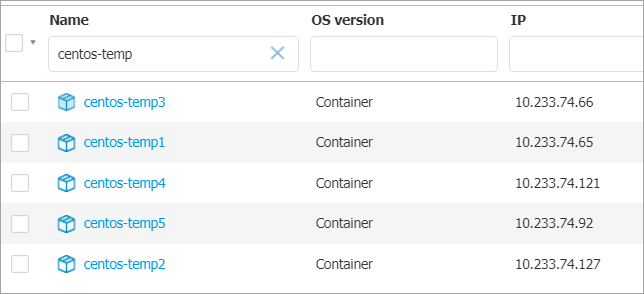
前往 网络 页面(通过 GravityZone 左侧菜单),确认该节点的容器组中新增了5个容器。
-
在受保护路径下创建恶意软件样本文件(如EICAR测试字符串文件) (位于容器主机上) .
root@node3:~# echo 'X5O!P%@AP[4\PZX54(P^)7CC)7}$EICAR-STANDARD-ANTIVIRUS-TEST-FILE!$H+H*' > /home/test1.txt
反恶意软件实时防护功能将自动检测EICAR文件并将其移至隔离区。
-
在受保护路径内创建恶意软件样本, 位于先前部署的某个容器中 .
root@tcor-temp-workspace:~# kubectl exec -it centos-temp5-lzq44 -- bash
[root@centos-temp5-lzq44 /]# echo 'X5O!P%@AP[4\PZX54(P^)7CC)7}$EICAR-STANDARD-ANTIVIRUS-TEST-FILE!$H+H*' > /home/test2.txt
反恶意软件实时防护功能将自动检测EICAR文件并将其移至隔离区。
-
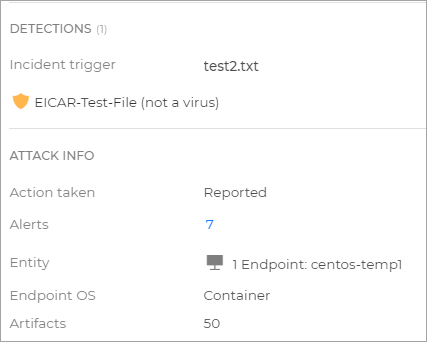
前往 事件 页面(通过 GravityZone 左侧菜单),确认存在2起源自反恶意软件功能的事件,分别对应
test1.txt和test2.txt.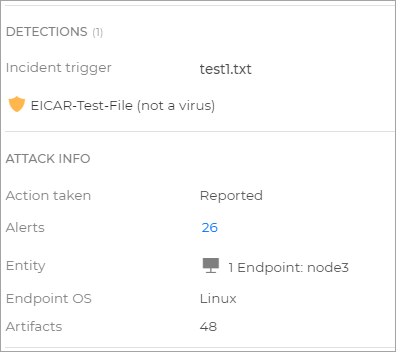
-
-
您现在可以删除为此测试创建的容器组。
产品更新
与BEST Linux v7的软件包版本不同,安全容器不支持产品更新。当新镜像版本发布时,需要 重新部署安全容器 .
安全内容更新
您可通过以下任一方式执行安全内容更新: